
Reading II: Reading Augmentation Systems
The previous lecture focused on the technologies underlying the book as we know it today: writing systems, punctuation, paper, and the format of the codex itself. Today, we shift our focus to how computers have already and may yet change how we read. Since the early days of personal computing, computers were long supposed to replace paper as the new medium of communication. In the 1980s, the notion of the “paperless office” started to gain traction, as exemplified by these Xerox PARC advertisements (they’re short, give them a watch):
However, the fabled paperless office did not materialize, at least not when predicted. A pair of researchers, Abigail Sellen and Richard Harper, set out to understand why. In their book The Myth of the Paperless Office [1], they wrote:
“Many of the workplaces we have studied have tried to go paperless, paying consultants to recommend the best digital solutions, organizing task forces to assess company needs, and buying and implementing the most up-to-date systems available. We have seen varying success in reducing paper use, ranging from dismal failure to mild reduction. We have also seen varying success in altering an organization’s work practices, from complete rejection of new systems to major overhauls of the ways of working. We have heard stories of paperless offices, but we have never seen one. More commonly, the introduction of new technology does not get rid of paper; it either increases it or shifts the ways in which it is used.”
(Luckily, this would be the last time companies ever tried to shoehorn new technologies into their workplaces with disregard for their effects on workers.)
Sellen and Harper investigated how office workers used paper by embedding themselves in organizations focused on knowledge work, such as the International Monetary Fund (IMF). They identified a wide range of tasks that workers performed using paper documents:
- Skimming: what is this document about? Will it be useful? Which parts should I read?
- Identification: what type of document is this?
- Reminding: what am I supposed to be doing right now?
- Searching: where is the information that helps me answer a question, or find a definition, or make a decision?
- Cross-referencing: where is the information referred to in this other text?
- Learning: how can I deeply understand this information?
- Listening: how does this information relate to what’s being said?
- Analysis: is this information valid?
This type of task taxonomy is useful to tease apart how different mediums affect a person’s ability to perform a particular kind of reading. For example, searching and cross-referencing are significantly aided by a computer which can automatically perform text searches or follow links to citations. But a key finding in Sellen and Harper’s work was how paper’s physicality afforded many interactions that digital documents could not:
- Paper permits use of the body to manipulate and sense a paper document. A person reading a book can stick a finger in one location, page to another one, flip back and forth, and so on. The pages of a report can have different weight or thickness to convey separation of sections.
- Paper can be laid out in physical space, such as placing two pages side-by-side for comparison. A large workspace could accommodate a dozen different sheets of paper in freeform arrangements.
- Paper permits rich annotations, whether by freeform pen in the margins and between lines, or by attachment of sticky notes. A person can use the full range of writing implements to make a range of notations: underlines, highlights, and asterisks in various weights and colors.
However, despite paper’s best qualities, the paperless office is becoming more of a reality with each passing year. Consider this graph of estimates of the volume of paper production across the world:
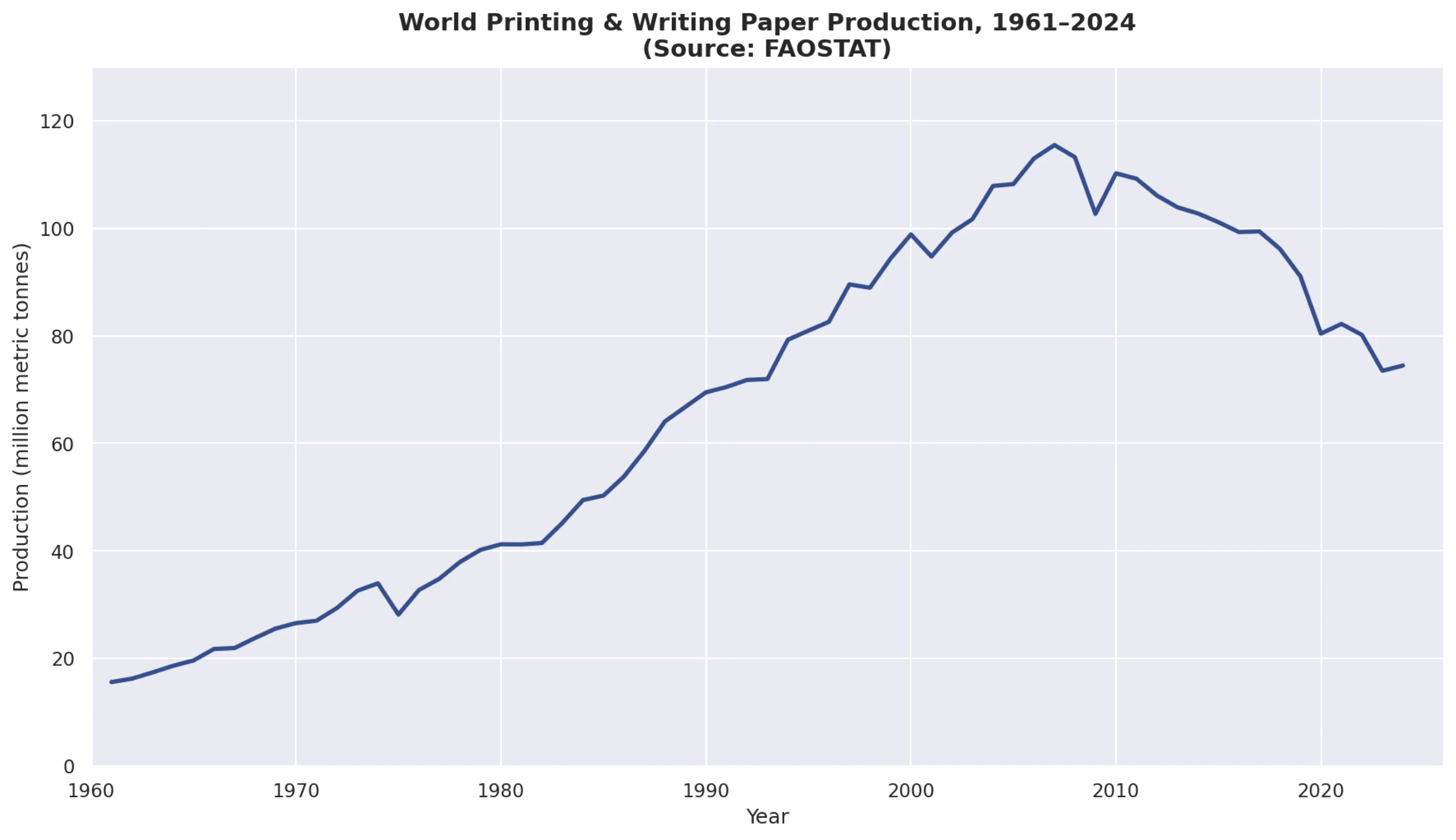
Paper production finally peaked around 2007, and has been in a precipitous decline since, unlikely to return. No company starting today will have an office filled with filing cabinets and reams of paper; the future is documents on computers, for better or for worse. It then behooves us to ask: how can we use computers to make text as pleasant, engaging, and fruitful to read as possible? For the remainder of this lecture, we will examine a variety of attempts, of varying quality, to augment how we read.
Typography
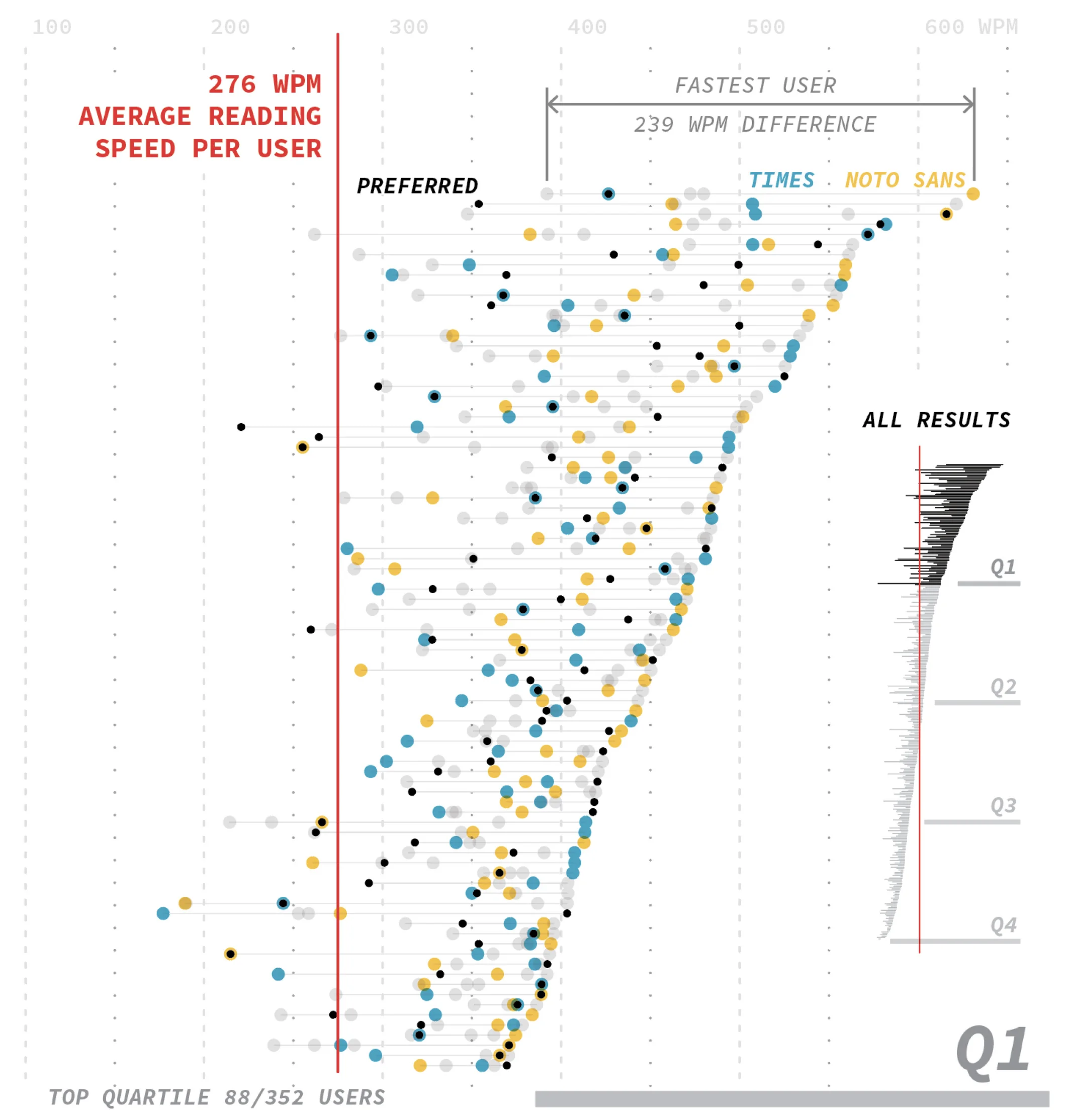
The foundation of reading is typography: how characters are shaped and laid out on the page. There has been a fair bit of research on the legibility of various fonts, especially for high-stakes situations like road signage [2]. But for reading standard long-form documents, we might ask questions like: is there a font or class of fonts which optimizes reading speed for your average adult reader? One study from Wallace et al. [3] suggests no, at least not for everyone. When having people read texts in fonts like Times New Roman and Noto Sans, they found that (a) people did read significantly faster in some fonts than others, and (b) there was no single font that was faster for everyone. This phenomenon is illustrated in their graph below:
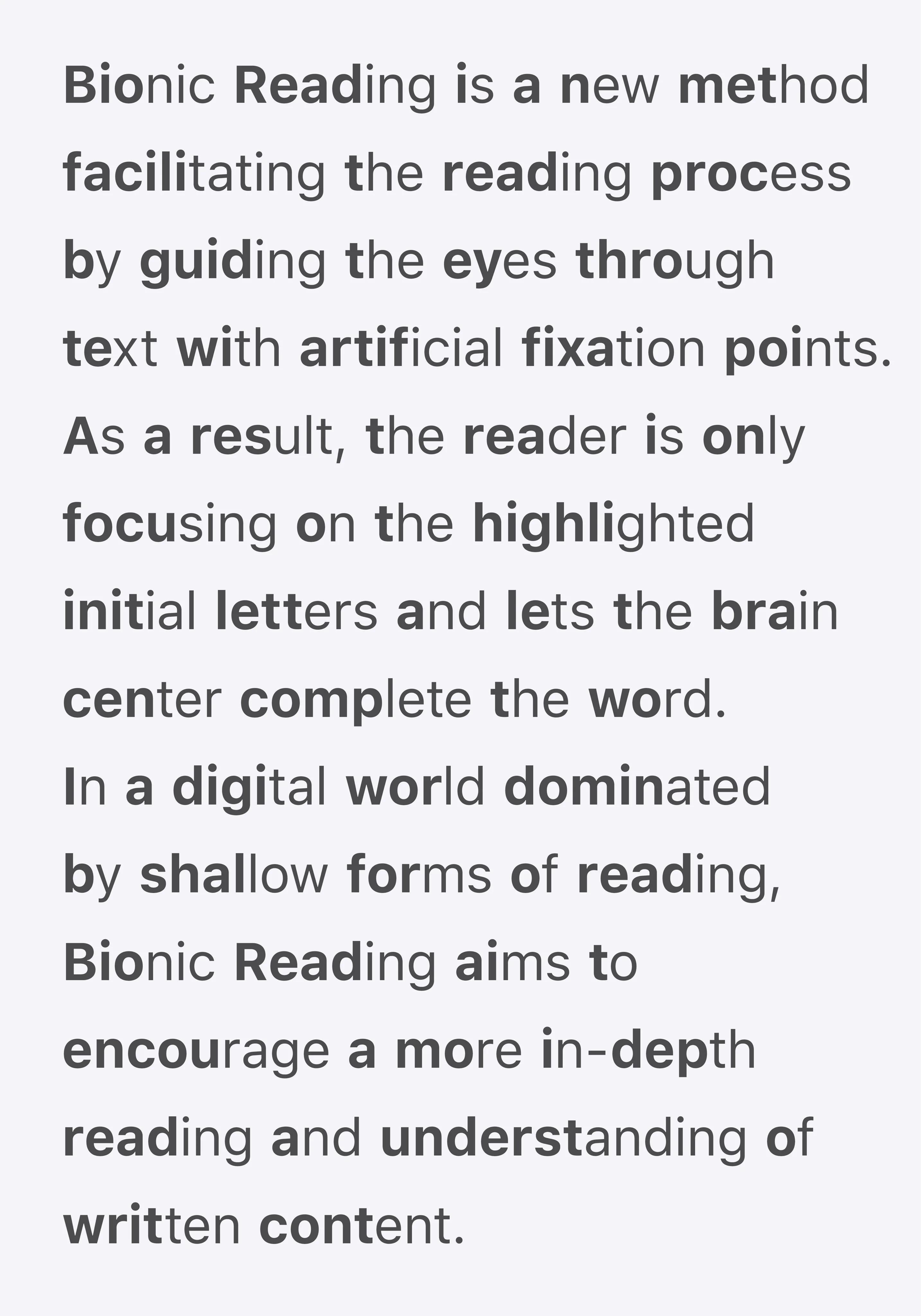
One promising avenue for reading augmentation is the creation of adaptive typesetting which facilitates faster reading. One prominent attempt is Bionic Reading, which places greater weight on certain letters of words:
Another is BeeLine Reader, which uses color gradients:
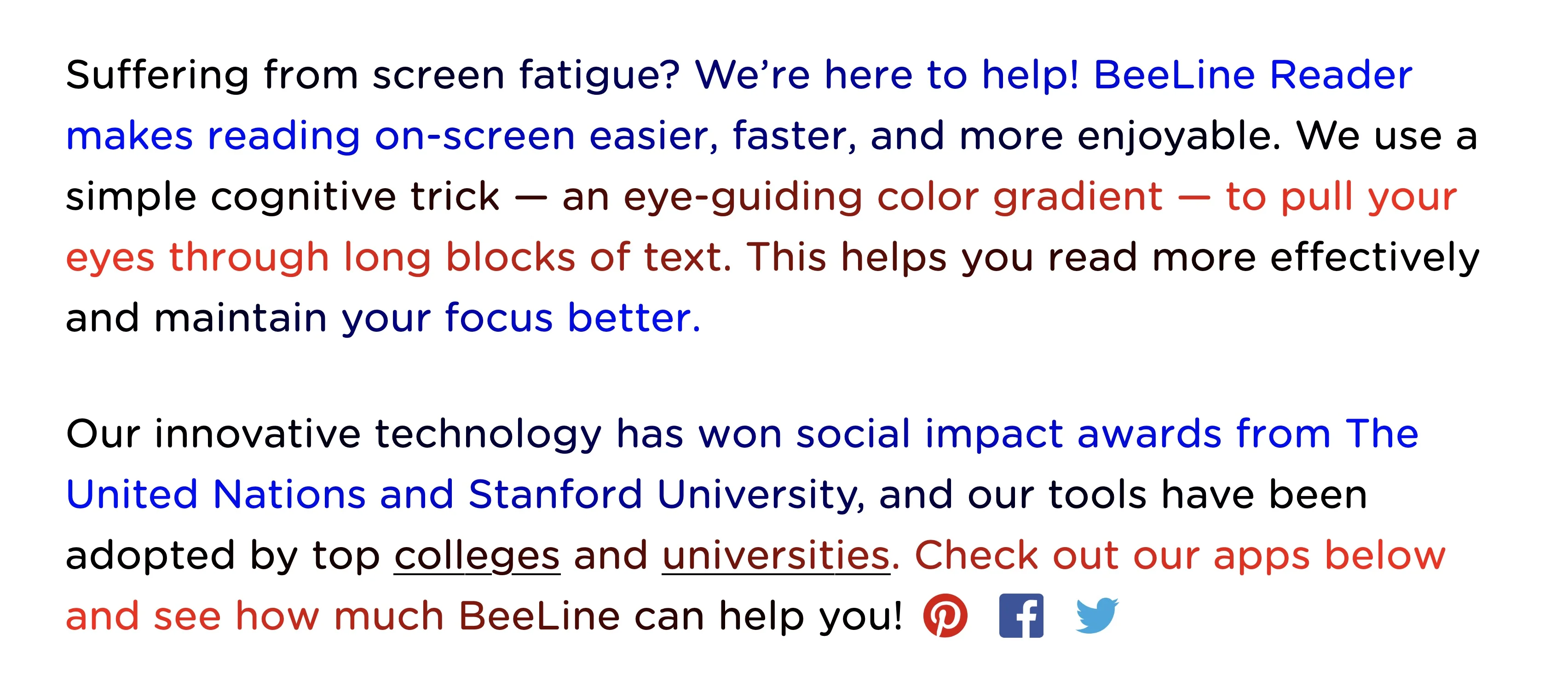
Unfortunately, all empirical studies performed on these techniques suggest little to no positive effect. Neither Bionic Reading [4] nor BeeLine Reader [5] has been shown to improve reading speeds for children or adults.
In a similar vein, people have attempted to design fonts to improve the accessibility of text for people with dyslexia, such as OpenDyslexic (top) and Dyslexie (bottom):
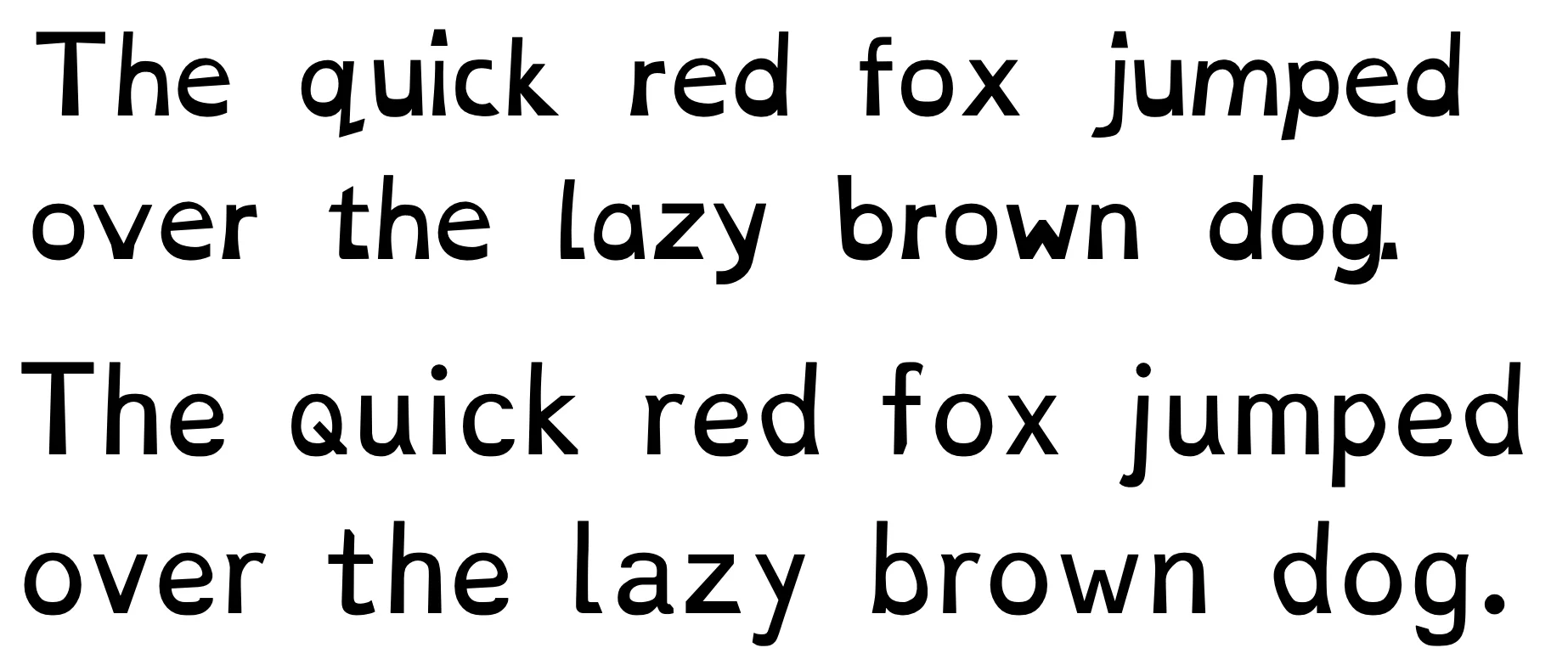
Again, in empirical tests, both OpenDyslexic [6] and Dyslexie [7] had no demonstrable effect on reading speeds for people with dyslexia compared to fonts such as Times and Arial.
Layout
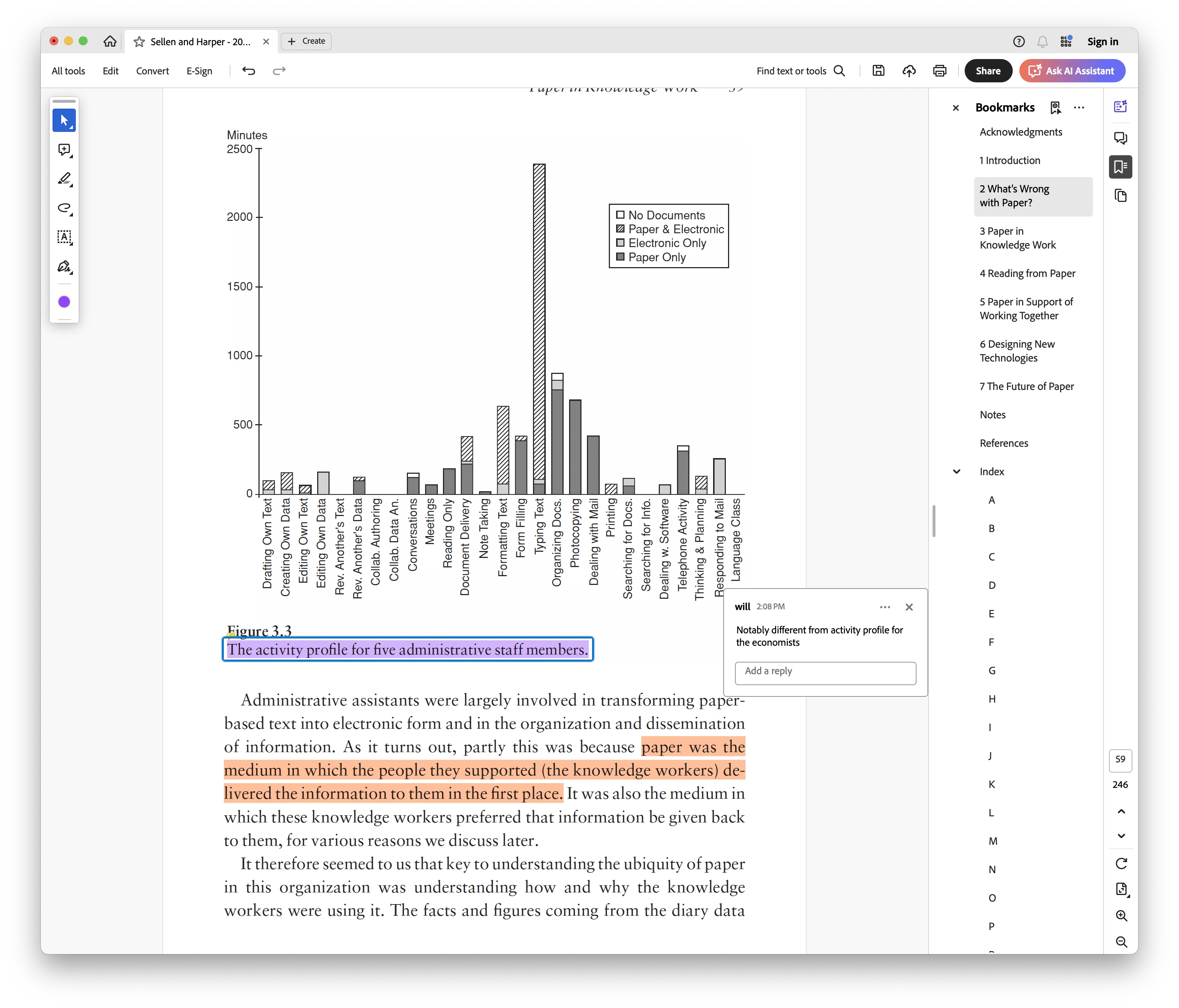
A major milestone for reading augmentation systems was the development of the Portable Document Format (PDF). Created by Adobe in 1993, the now-ubiquitous PDF offers a way to consistently render a static document on any screen. Today’s PDF readers offer many reading tools, such as text search, highlights, tables of contents, and so on. Adobe Acrobat is a canonical point of reference:
PDF works by defining exactly where and how each line of text is rendered on a page. For example, consider this screenshot of a short snippet from the PDF of Thomas Piketty’s Capital and Ideology:
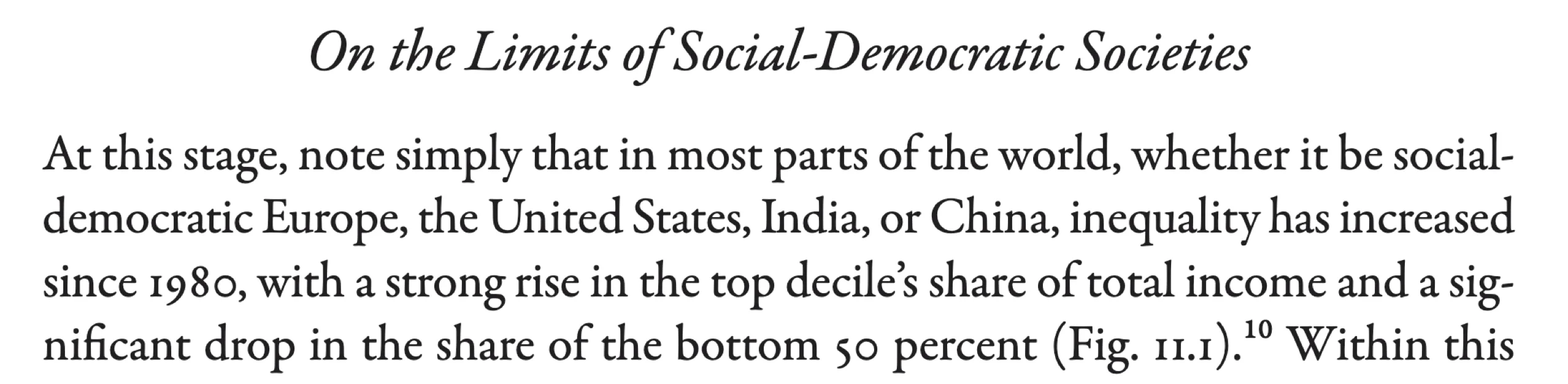
The corresponding segment of the PDF looks like this:
/Times-Italic findfont 24 scalefont setfont
306 680 moveto
(On the Limits of Social-Democratic Societies) show
/Times-Roman findfont 18 scalefont setfont
72 620 moveto
(At this stage, note simply that in most parts of the world, whether it be social-) show
If you’ve ever dealt with turtle graphics or G-code, then PDF has a similar feel. The document renderer has a metaphorical pen, and the PDF contains commands which move, stylize, or draw with the pen. The first command above swaps into a particular font (24-point italic Times), the second command moves to a location on the document, and the third command writes the given text at the current location and using the current font. It’s all very stateful and imperative.
The upside to this representation is its consistency. A PDF will render the same way on every single screen, if the PDF reader is implemented properly. The downside to this representation is its lack of structure. For example, if I wanted to render my PDF at a smaller width and reflow the text into smaller columns, PDF is not designed to handle those requests. Additionally, PDF has tenuous support for any form of dynamic content (videos, widgets, etc.).
PDF is one of many formats for representing electronic documents, sometimes called e-books. The other major format which offers a different set of tradeoffs is EPUB (Electronic Publication). There are other comparatively moribund formats like MOBI, but as far as I can tell, EPUB is the principal alternative to PDF in 2026. An EPUB is, more or less, a ZIP file of a website. For example, the EPUB representation of the same snippet above looks like this:
<section>
  <h2>On the Limits of Social-Democratic Societies</h2>
  <p>
    At this stage, note simply that in most parts of the world,
    whether it be social-democratic Europe, ...
  </p>
   ...
</section>
EPUBs are rendered using a standard browser such as Chromium or using a bespoke renderer like on Kindle. Unlike PDF, an EPUB can be rendered at different screen sizes and in different fonts. An EPUB can more easily contain interactive content, and more easily be parsed by a script. However, its lack of consistent rendering is today the Achilles heel of EPUB. For example, compare the PDF and EPUB rendering of a particular page in A History of Writing:
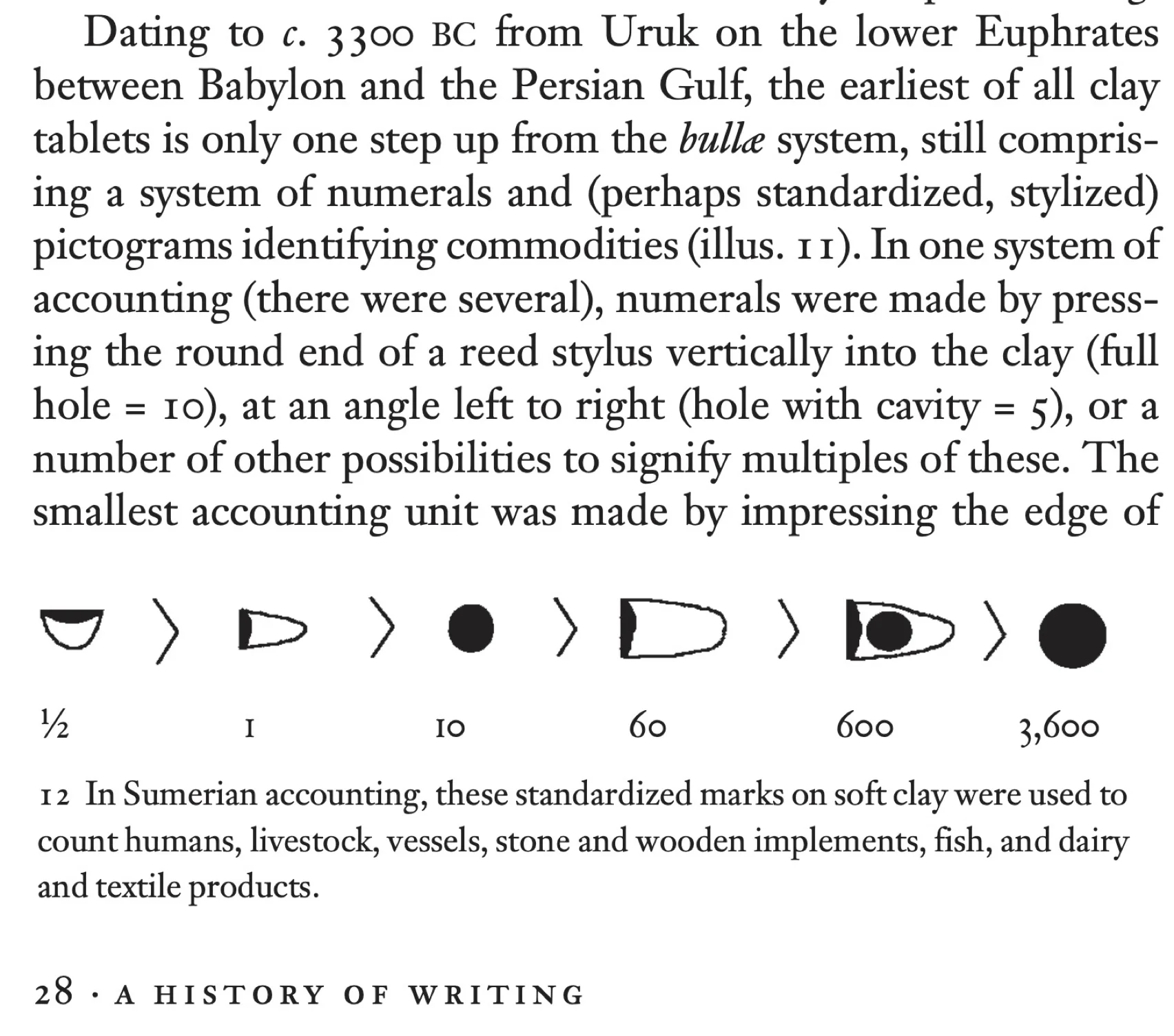
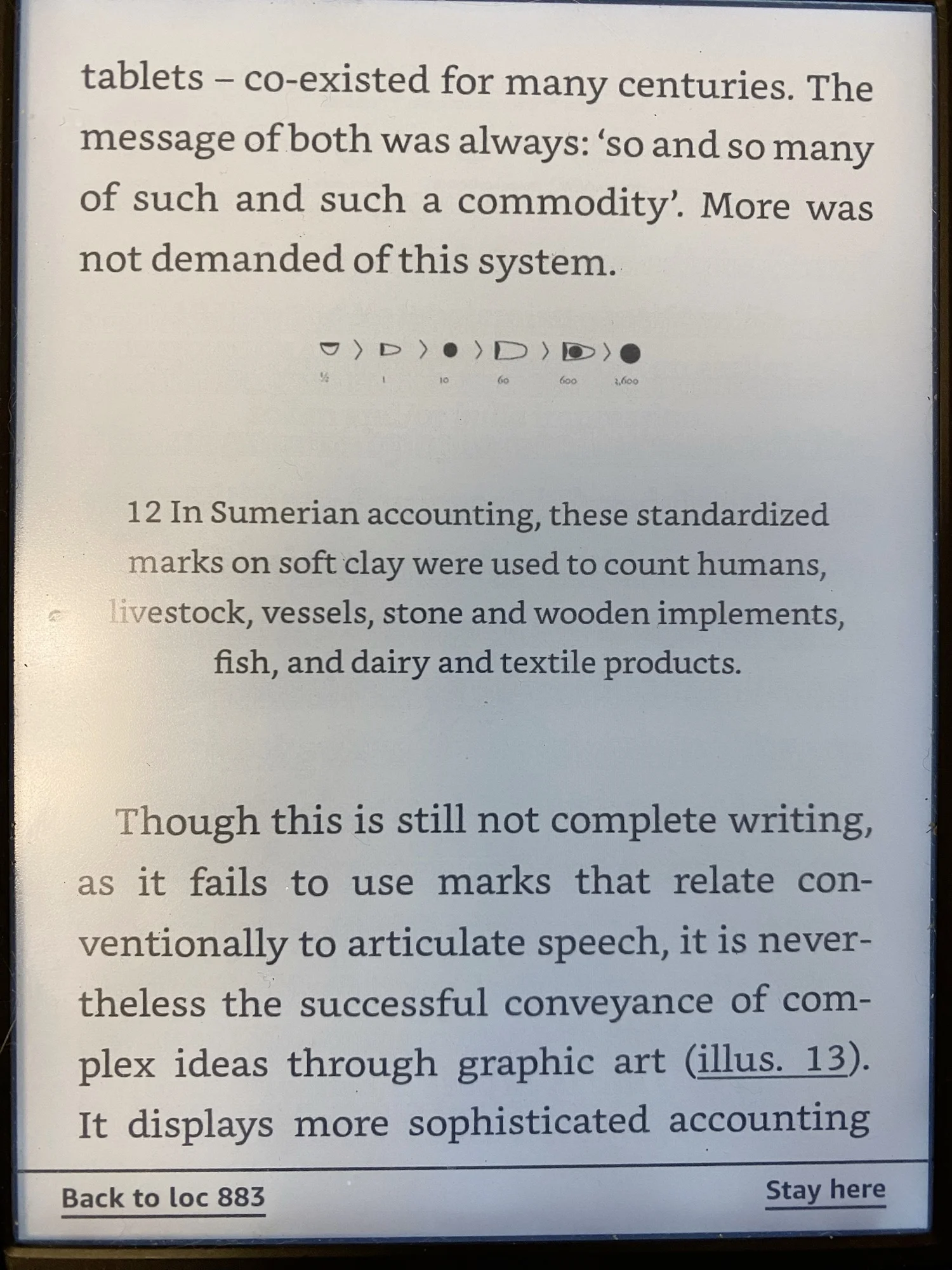
You will be hard-pressed to find someone who prefers the right to the left. The figure’s image, numbering, and caption are terribly ugly on the Kindle. This is not an unfixable issue, but it is indicative of the lowered quality one comes to expect from an EPUB versus a carefully typeset PDF.
All this is to say, I am optimistic that EPUBs or similar structural formats offer a brighter future for augmented reading on computers (see: my notes on Portable EPUBs). But there needs to be a concerted effort to resolve the transition from fixed-width, paginated, static documents to dynamic-width, infinite-height, dynamic documents. How will we have stable citations to text without page numbers? How will we render footnotes and figures without page boundaries? Now is a good time to investigate these questions!
Interaction
One of the oldest critiques of the written word is its inability to talk back as a human can. In Plato’s Phaedrus (370 BCE), he wrote:
“I cannot help feeling, Phaedrus, that writing is unfortunately like painting; for the creations of the painter have the attitude of life, and yet if you ask them a question they preserve a solemn silence. And the same may be said of speeches. You would imagine that they had intelligence, but if you want to know anything and put a question to one of them, the speaker always gives one unvarying answer.”
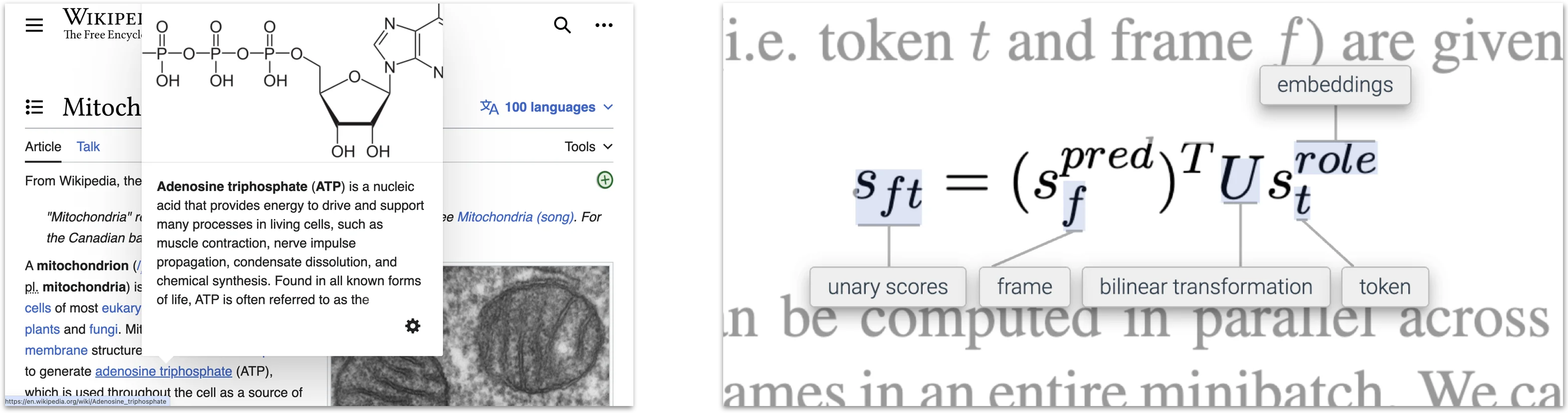
A grand promise of computing (and now, especially, artificial intelligence) is to give a partial remedy to this problem: allowing readers to interact with their documents. One foundational interaction is the link, allowing readers to quickly get additional context on concepts used in a document. I am a particular fan of the contextual popup, providing windows into link content without interrupting the reading experience. For example, Wikipedia will show previews of linked content on hover. Experimental reading systems like ScholarPhi [8] will show contextual information about paper-specific symbols in math equations.
Another such interaction is keeping content in sync. In particular, when a document is talking about something (source code, a diagram, etc.), then the reading environment can automatically update its focus as the reader moves through a document. For example, Stripe has interactive documentation for reading about its payments API. Try scrolling through the text and see how the code updates: docs.stripe.com/checkout/quickstart
A much grander ambition for interactive documents is the concept of explorable explanations, or documents which contain computational simulations that the user can manipulate (see: explorabl.es for many examples). One of the masters of the genre is Bartosz Ciechanowski, who writes detailed explanations of STEM topics like GPS, mechanical watches, and cameras and lenses. Take a moment to read through one of his articles, it’s worth your time.
To write an explorable explanation requires nontrivial technical and design expertise. Distill was an online journal for explorable explanations of machine learning concepts, and they shut down in part due to the burden of editing these articles [9]:
“We don’t believe that having a venue is the primary bottleneck to authors producing more Distill-style articles. Instead, we believe the primary bottleneck is the amount of effort it takes to produce these articles and the unusual combination of scientific and design expertise required.”
Researchers have developed bespoke document languages to address the technical burden, such as Living Papers [10]. But to me, the more interesting question is: when do explorable explanations serve their purpose? And what is their purpose, anyway? According to the homepage of explorabl.es:
“Lion cubs play-fight to learn social skills. Rats play to learn emotional skills. Monkeys play to learn cognitive skills. And yet, in the last century, we humans have convinced ourselves that play is useless, and learning is supposed to be boring.
Gosh, no wonder we’re all so miserable.
Welcome to Explorable Explanations, a hub for learning through play! We’re a disorganized “movement” of artists, coders & educators who want to reunite play and learning.”
Bret Victor, the designer who coined the term “explorable explanation” in his article Ten Brighter Ideas?, offers a different view:
“the term “explorable explanation” […] has now been applied so broadly that it seems to mean “any article with interactive pictures” […]
However, [most explorables] are pedagogical, and that’s not really what I was going for here. What I meant by “explorable explanation” was more like, “a written argument whose assertions are backed by explorable computational models, whose facts, assumptions, and calculations are all visible and editable”.
The author’s role here is not just to teach, but to convince. The reader’s role is not to believe, but to critically evaluate, rebut, and come to a broad understanding. The reader rebuts by modifying the models.”
These views represent different goals for an interactive document: to teach or to persuade. (Notably, the latter is much closer to addressing Plato’s critique!) We will talk about each purpose in greater depth later in the course, in the units on Learning and on Computational Notebooks. For now, suffice it to say: merely attaching sliders and buttons to text is no guarantor of learning or persuasion. You are going to see a lot more interactive content like this in the years to come thanks to AI, and most of it will be really really bad.
Note-taking
As discussed in the opening to this lecture, a key element of deep reading is the ability to take notes: to highlight, to cut snippets, to jot down thoughts, to make connections, and so on. Today, you can find myriad note-taking applications which allow you to attach annotations to a PDF. Apps like Goodnotes, OneNote, Notability, and Noteful offer roughly the same set of note-taking facilities. They all share the same major limitation: organizing ideas at any depth beyond highlights or sticky notes is extremely difficult. They expect most in-depth note-taking to happen apart from the document.
HCI researchers have developed a number of interfaces to address this problem, offering richer ways to attach long-form annotations to documents. I personally use and enjoy LiquidText. This video demonstrates its core features in a short demo: www.youtube.com/watch?v=6oBr72h_wfA
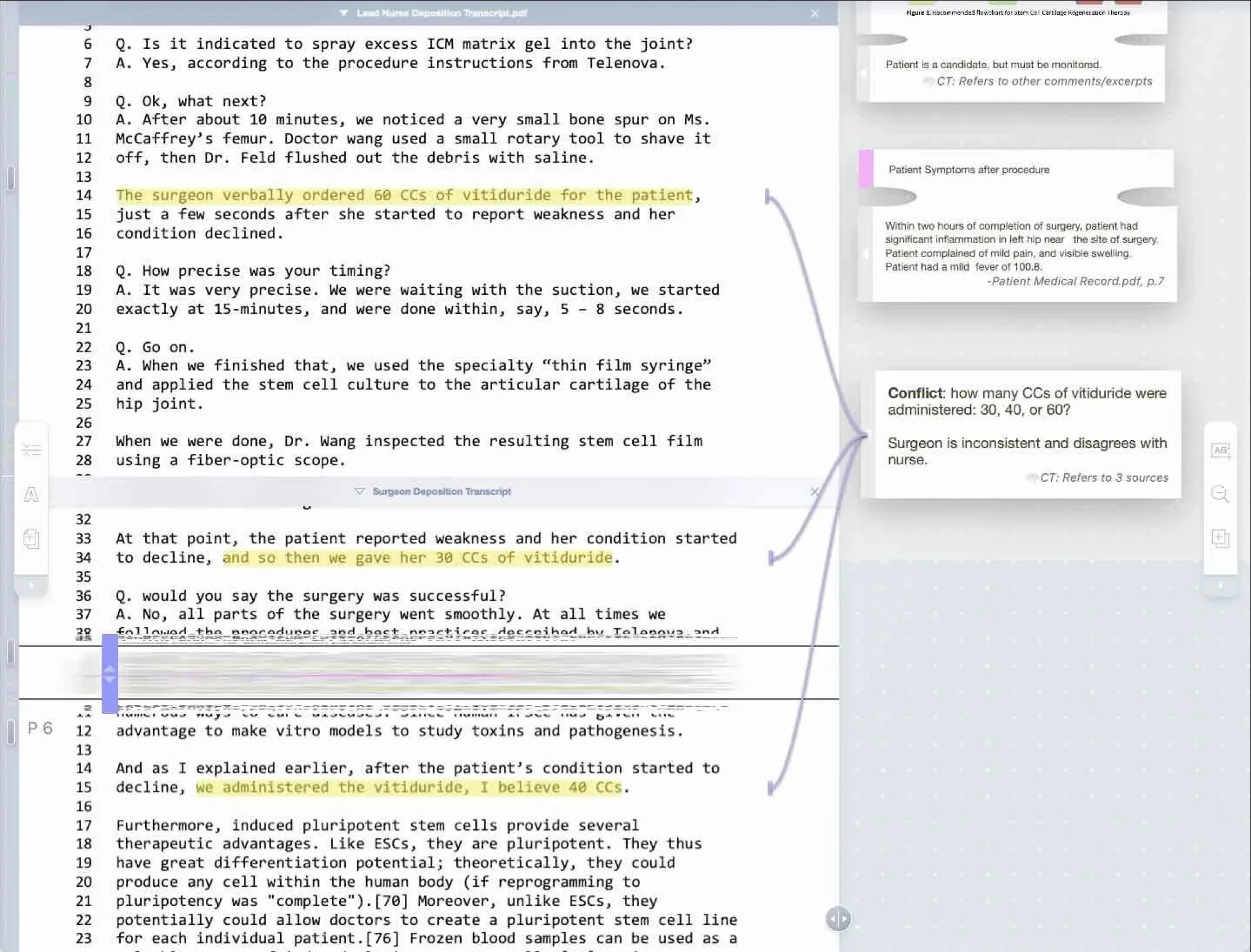
The academic publication which originated LiquidText offers its motivation [11]:
“However, while current systems may have succeeded in mimicking key affordances of paper, paper itself is not the non plus ultra of active reading. O’Hara’s description of the actions that occur in the [active reading] AR process highlights the many weaknesses of paper; while paper supports some things well—such as freeform annotation and bimanual interaction—it lacks the flexibility for others. For example, viewing disparate parts of a document in parallel, such as for comparison or synthesis, can be difficult in a paper document such as a book. Even annotation—traditionally seen as a strong point for paper—can be constraining, complicating the creation of large annotations, or marginalia that refer to disparate or large portions of text, or to multiple texts. And though the tangibility of paper does support some rapid forms of navigation, the linear nature of most paper texts gives the reader little flexibility for creating their own navigational structures.
All this is not to say paper is bad; however, purely mimicking the affordances of paper in a computer-based system may not address all of the opportunities for improvements that digital technology can potentially provide. Particularly, a more flexible fundamental approach to document representation may provide opportunities to better support AR.”
I appreciate the last paragraph especially – trying to make the computer act exactly like a real-world object can be helpful as a transitional stage for getting people on board, but it is not the most efficient way to use the computer to augment cognition! LiquidText offers a fundamentally non-physical space, the infinite canvas, along with non-physical annotations such as threads that connect annotations to text.
Tools like LiquidText are still restricted by operating on PDFs. One interesting direction is combining the power of structural formats like EPUB with more powerful note-taking environments. For example, if a document can be dynamically reformatted, that permits annotation interactions like SpaceInk [12] where the user can “open up” spots to place annotations:
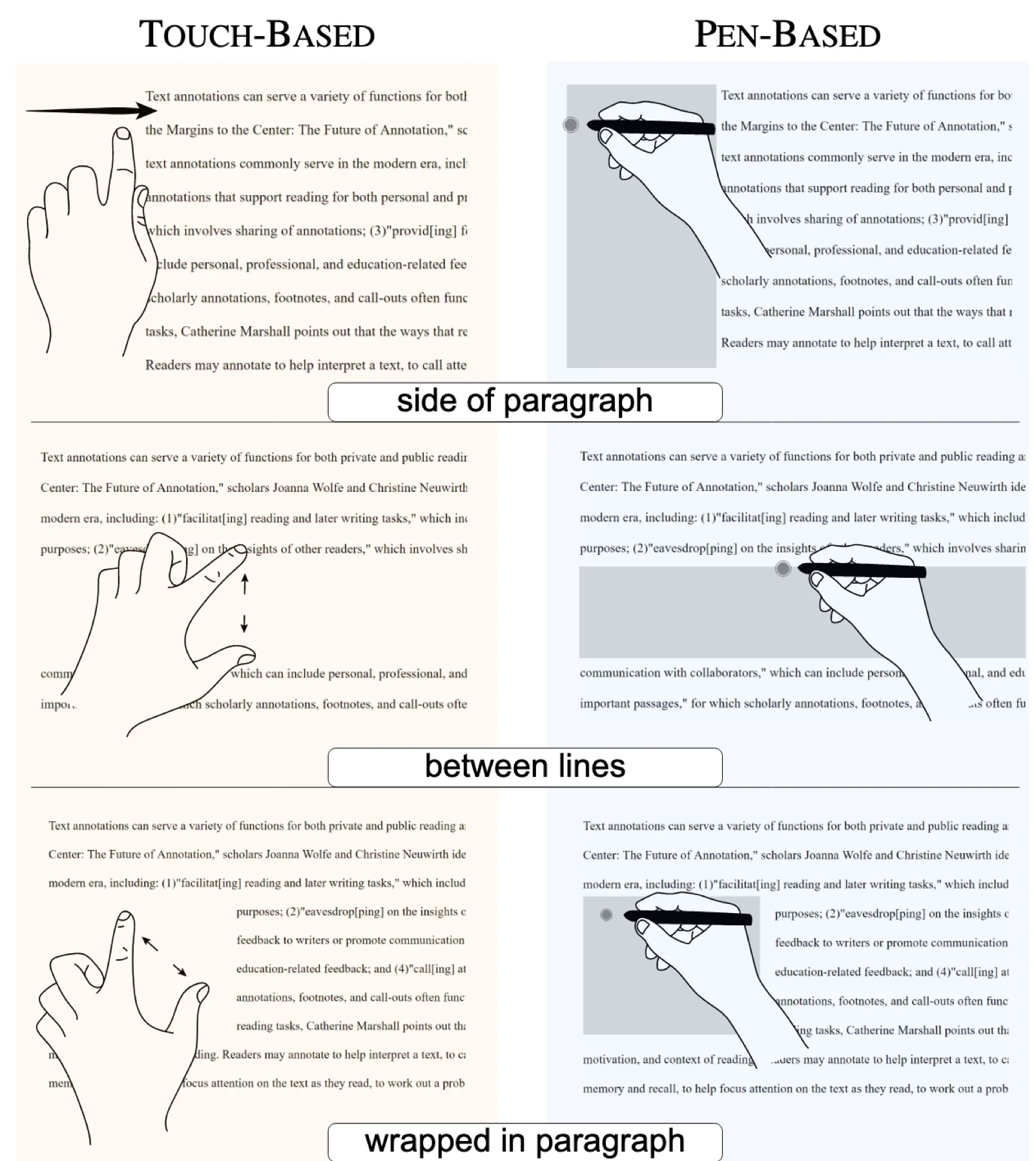
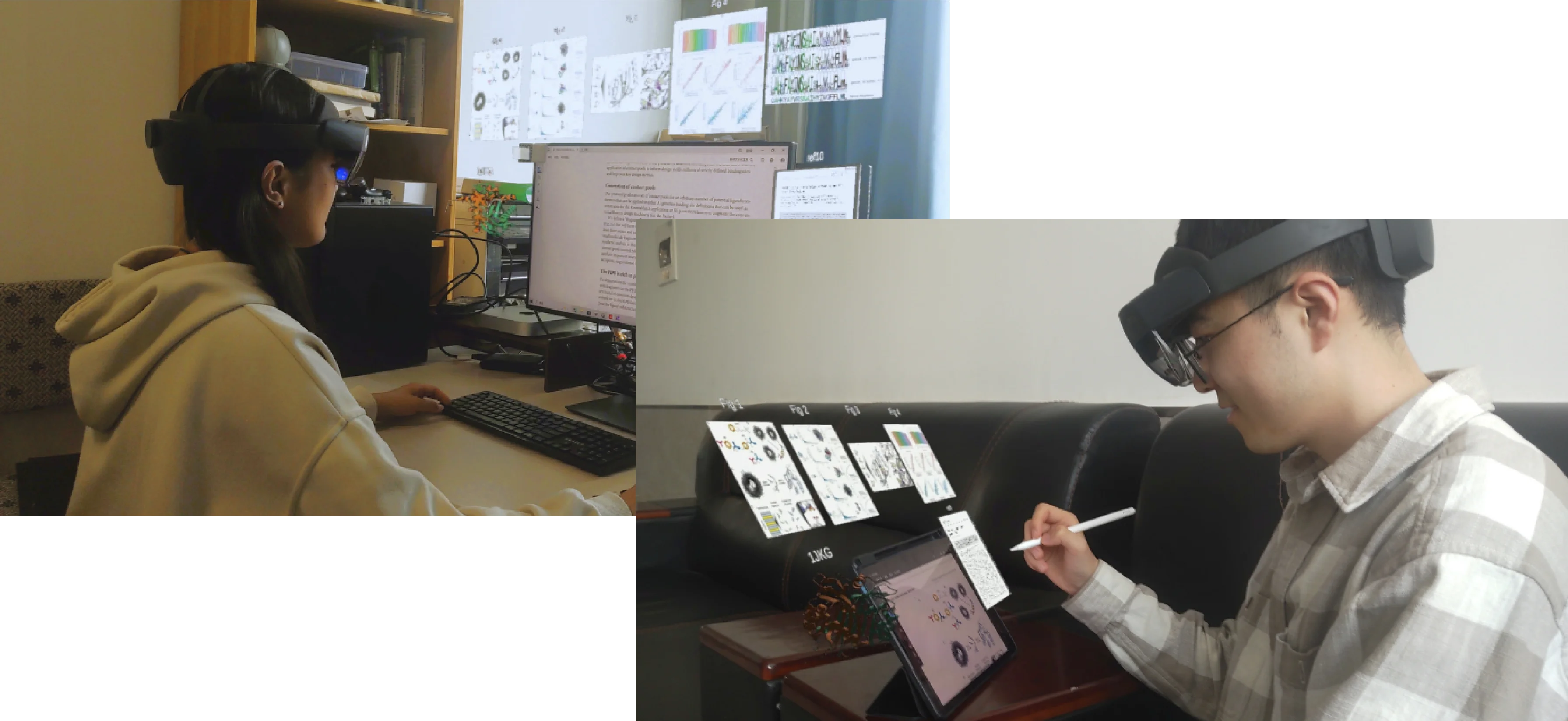
More broadly, an open frontier today is: where should readers find extra space for their annotations? LiquidText says: in a separate canvas confined to your tablet. SpaceInk says: in the expandable margins of your document. Some researchers are experimenting with augmented reality hardware for expanding beyond the screen, as in this work [13]:
Next week, we’ll dive deeper into tools for organizing information by discussing the long road from encyclopedias and indices to modern hypertext.
References
- Abigail Sellen and Richard Harper. The Myth of the Paperless Office. 2002. ↩
- National Academies of Sciences, Engineering, and Medicine. Human Factors Guidelines for Road Systems. 2025. ↩
- Wallace et al. Towards Individuated Reading Experiences: Different Fonts Increase Reading Speed for Different Individuals. 2022. ↩
- Joshua Snell. No, Bionic Reading does not work. 2024. ↩
- Koornneef and Kraal. Does BeeLine Reader’s gradient-coloured font improve the readability of digital texts for beginning readers?. 2022. ↩
- Wery and Diliberto. The effect of a specialized dyslexia font, OpenDyslexic, on reading rate and accuracy. 2016. ↩
- Kuster et al. Dyslexie font does not benefit reading in children with or without dyslexia. 2017. ↩
- Head et al. Augmenting Scientific Papers with Just-in-Time, Position-Sensitive Definitions of Terms and Symbols. 2021. ↩
- Distill Editorial Team. Distill Hiatus. 2021. ↩
- Heer et al. Living Papers: A Language Toolkit for Augmented Scholarly Communication. 2023. ↩
- Tashman and Edwards. LiquidText: a flexible, multitouch environment to support active reading. 2011. ↩
- Romat et al. SpaceInk: Making Space for In-Context Annotations. 2019. ↩
- Liu et al. DocVision: a Seamless, Cross-Device Immersive Active Reading Framework for Digital Academic Literature. 2025. ↩